
📥 Try It Yourself
Want to explore a fully populated world? Download the official example vault. It contains character sheets, locations, and interconnected lore that you can open directly in Chronicler.
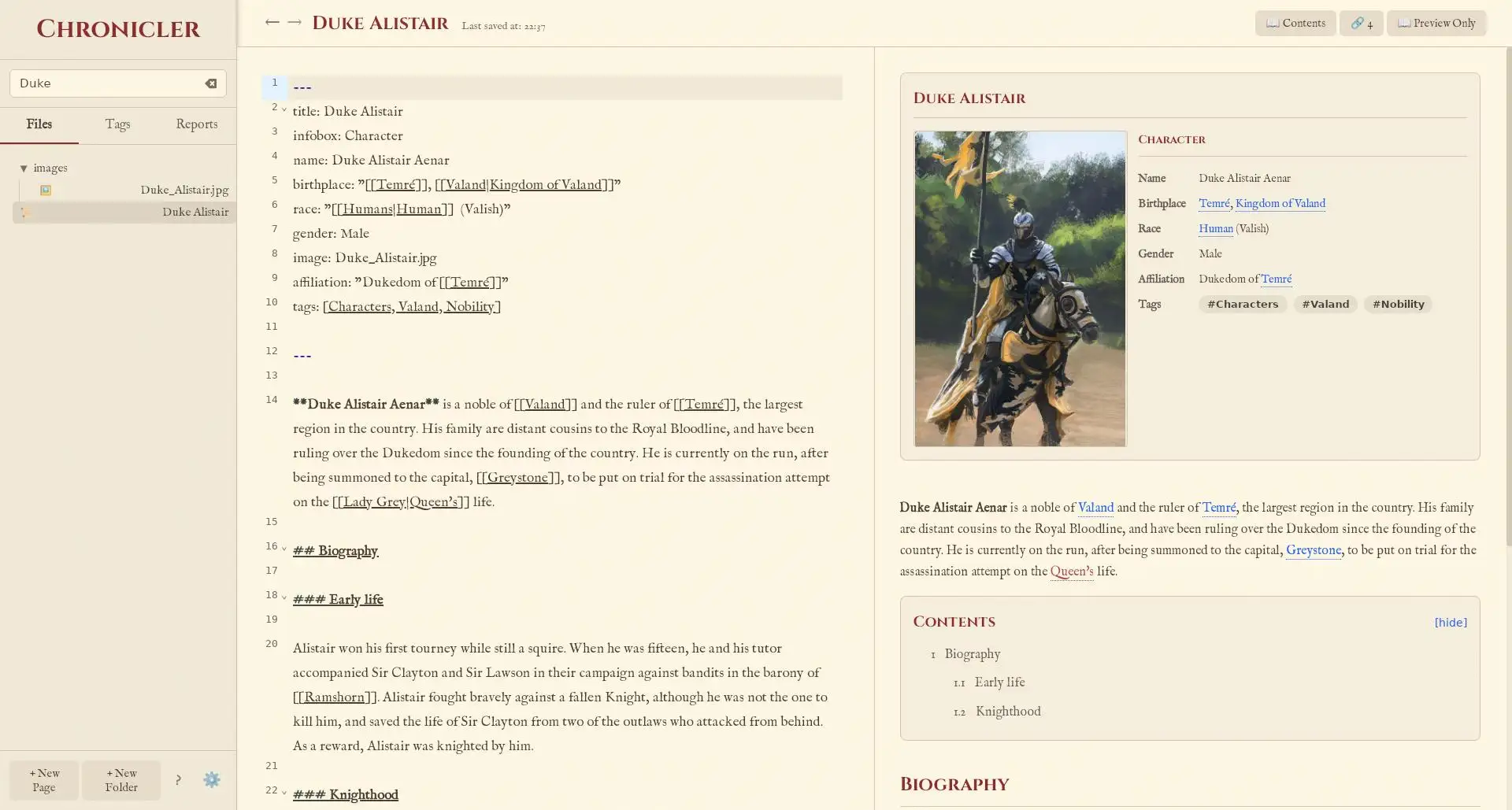
The Duke Alistair page rendered in Chronicler.
The Raw Markdown
Chronicler notes are written in plain text Markdown. Here is the complete content for our sample character, Duke Alistair.
---
title: Duke Alistair
infobox: Character
name: Duke Alistair Aenar
birthplace: '[[Temré]], [[Valand|Kingdom of Valand]]'
race: '[[Humans|Human]] (Valish)'
gender: Male
image: Duke_Alistair.jpg
affiliation: 'Dukedom of [[Temré]]'
tags: [Characters, Valand, Nobility]
---

**Duke Alistair Aenar** is a noble of [[Valand]] and the ruler of [[Temré]], the largest region in the country. His family are distant cousins to the Royal Bloodline, and have been ruling over the Dukedom since the founding of the country. He is currently on the run, after being summoned to the capital, [[Greystone]], to be put on trial for the assassination attempt on the [[Lady Grey|Queen's]] life.

## Biography

### Early life
Alistair won his first tourney while still a squire. When he was fifteen, he and his tutor accompanied Sir Clayton and Sir Lawson in their campaign against bandits within the barony of [[Ramshorn]]. Alistair fought bravely against a fallen Knight...
Feature Breakdown
Each part of the raw Markdown above corresponds to a specific feature in Chronicler, making your notes come alive. Refer to the screenshot above to see these elements rendered in the application!
🔖 YAML Frontmatter & Infobox
The block at the top, enclosed by --- lines, is the
YAML frontmatter. This is where you store structured metadata about
your note. Chronicler uses this information to automatically generate
the detailed infobox visible on the right side of the screenshot.
title,infobox,tags, andimageare special fields that control the infobox's core appearance and functionality.- Any other fields you add (like
relatives,affiliation,race,gender, etc.) are automatically displayed as rows in the infobox, allowing you to organize and present structured data clearly.
🔗 Linking Between Pages (Wikilinks)
You can create powerful, bidirectional links to other pages in
your vault by wrapping the page name in double brackets, like [[Greystone]]. This is the core mechanism for building your interconnected
wiki.
- If you link to a page that doesn't exist yet, Chronicler will automatically create it for you when you click the link.
- You can create "aliased" links to display different text
than the actual page name. For example,
[[Lady Grey|Queen's]]links to the "Lady Grey" page but displays as "Queen's" in the text, as seen in the screenshot's main content.
🏷️ Tagging for Organization
The tags: [Characters, Valand, Nobility] line in the
frontmatter is used to categorize your notes. In the Chronicler application,
you can click on any tag (either in the infobox or a dedicated tags
view) to see a list of all pages that share that tag. This provides
a flexible and powerful way to group related information in your
world.
Want to learn more?
This example covers some of the core features. For a full breakdown of everything you can do, including spoilers, tables, and importing Word documents, check out the complete guide.
Read the Getting Started Guide